
Wonder Town › Worksheet to math game
Turn your child’s math homework into a 3D adventure
Is there a way to turn my child’s math homework, and the questions they got wrong, into a game they will actually play? In Wonder Town there is. Photograph a marked test or a worksheet, and its questions become the ones the villagers ask in a floating 3D town, again and again over days, until your child knows them.
First town: no account needed · First 3 towns free · No download
Plays onComputersiPad and tabletsiPhone and Android
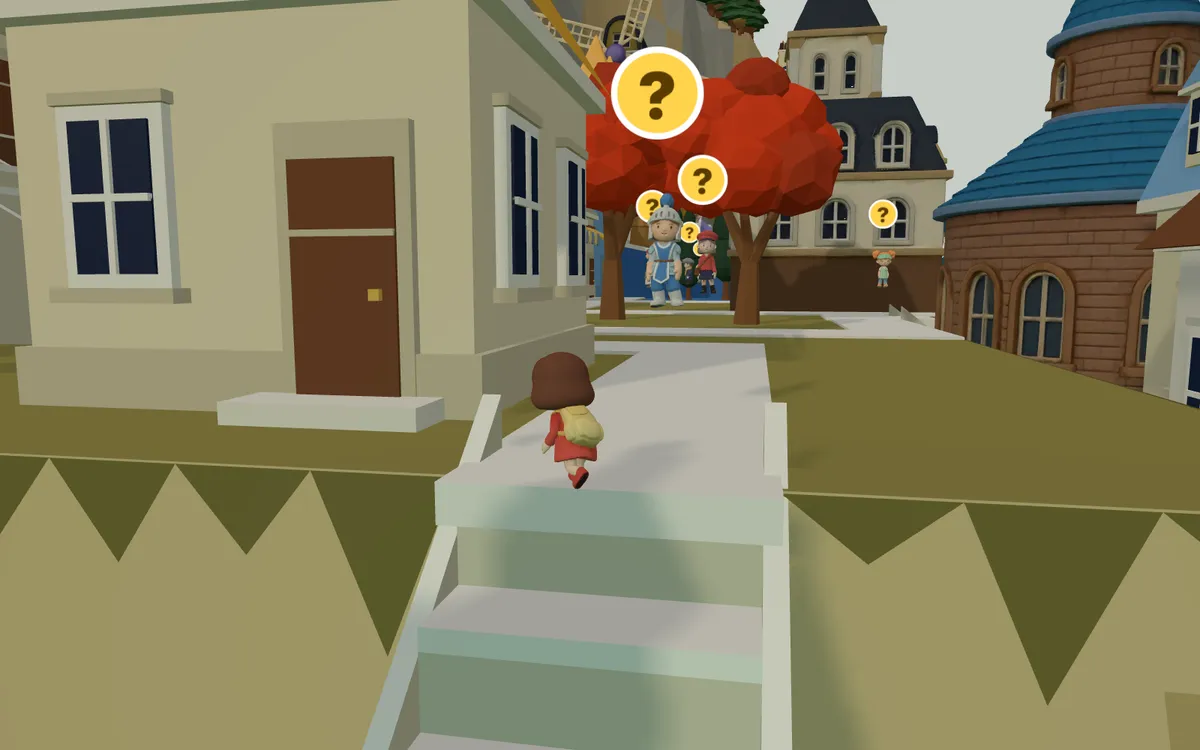
The short answer
With a Passport, open a question bank of your own and take a photo of a test, a worksheet or a homework page, printed or handwritten. An AI model finds the questions, or only the ones marked wrong, checks each one against the photo and adds them to the bank as multiple-choice questions in the language of the photo. Load the bank and play: the villagers ask the questions that are due first, and missed questions come back by spaced repetition until they stick.
Question banks of your own are part of the Passport ($19.80 a month): up to 20 banks of up to 500 questions each. Reading a photo costs a few coins, by how much the AI reads. The photo is deleted within two days; only the questions are kept.
Wonder Town at a glance
- What it is
- A 3D math adventure game for kids in grades 1–5 (ages 6–11)
- Free
- The first 3 towns
- Account
- None needed for the first town; a free account for towns 2 and 3
- Passport
- $19.80 a month: all 13 towns, cancel any time
- Own question banks
- With the Passport, from photos of tests and homework
- Towns
- 13, each with its own story; the last one reviews every topic
- Ads and chat
- None
- Plays on
- Computers, iPad and other tablets, iPhone and Android phones, in the browser; no download
A real example
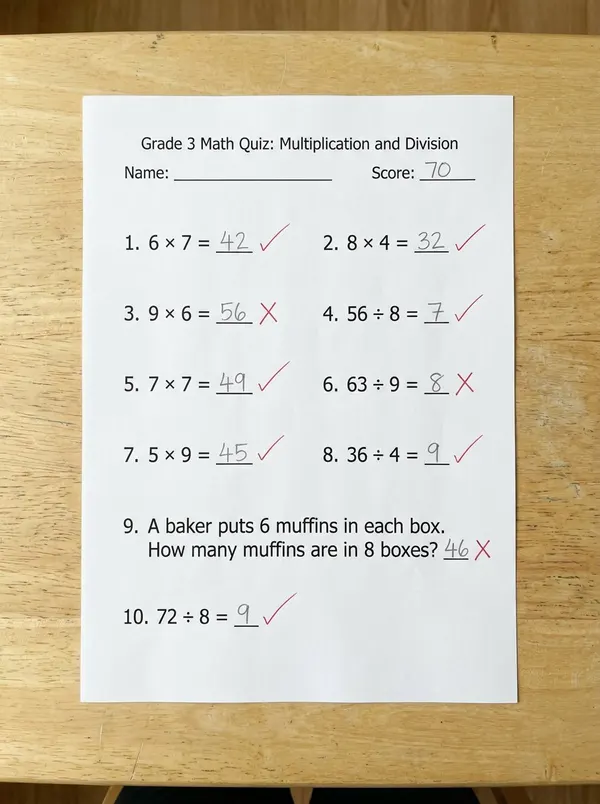
From this photo the AI read the three questions marked ✗ and added them to the bank, each with four choices and an explanation, ready for the villagers to ask. Reading it cost 3 coins.
3. 9 × 6 = ___
- 56
- 54
- 45
- 63
How to think about it: 9 × 6 = 54.
6. 63 ÷ 9 = ___
- 8
- 7
- 6
- 9
How to think about it: Since 9 × 7 = 63, 63 ÷ 9 = 7.
9. A baker puts 6 muffins in each box. How many muffins are in 8 boxes? ___
- 46
- 48
- 42
- 56
How to think about it: There are 6 muffins in each of 8 boxes, so 6 × 8 = 48 muffins.
From photo to town in four steps
- Snap a photo of a test, a worksheet or a homework page, or choose photos you already have. Switch on “only questions marked wrong” to keep just the ✗ and circled ones.
- The AI reads every question on the page and writes it as a multiple-choice question with its answer and a short explanation.
- It checks its own work against the photo: questions that do not match the page are corrected or dropped. Read the list and delete any you do not want.
- Load the bank in the stone stele and play. Each villager who blocks the road asks one of your questions.
When each question comes back
| Right answers in a row, each when it was due | The question comes back in |
|---|---|
| 1 | 10 minutes |
| 2 | 1 day |
| 3 | 3 days |
| 4 | 7 days |
| 5 | 14 days |
| 6 | 30 days |
| 7 or more | 60 days |
| A wrong answer | At once, and the count starts again |
In each town the villagers ask the questions that are due first, then new ones, then the ones nearly due or often missed. Within one town a question answered right is not asked again.
What works well, and the limits
- Works well: math tests, quizzes, worksheets and homework pages, printed or handwritten, with the marking on them. A clear, flat photo in good light reads best.
- Any language: a question stays in the language it was written in.
- Multiple choice only: an open question becomes “pick the right answer”.
- Text only: questions that need a picture to answer (a shape, a chart, a number line, a clock face) are left out, because the game shows text. A question with several parts becomes one question per part.
Who it suits
A good fit if
- Your child brings home marked tests and worksheets
- You want practice aimed at exactly what was missed, not a generic set
- You want the missed questions to come back over days and weeks
Look elsewhere if
- Most of the homework is geometry or graphs that need pictures
- You want to try before paying: play the free towns with a ready-made bank first
Questions parents ask
Does it work with handwritten worksheets?
Yes. Printed and handwritten pages both work, as long as the photo is clear. The marking on the page (✗ or a circle) is what “only questions marked wrong” looks for.
What does it cost?
Making question banks is included in the Passport ($19.80 a month), up to 20 banks of 500 questions. Reading a photo costs a few coins, by how much the AI reads; the sample quiz on this page cost 3. Coins come from playing, one for every right answer, or from a top-up.
What happens to the photo?
It is used only to read the questions, stored privately, read by an AI model (OpenAI, through OpenRouter) and deleted automatically within two days. The questions stay in your bank until you delete them. We do not use your photos or questions to train AI models.
Can I check and delete the questions?
Yes. The bank lists every question with its answer, its explanation, how often it was answered right and wrong and when it comes back. Delete any of them, or the whole bank, at any time.
Is there a free way to try Wonder Town first?
Yes. The first three towns are free with a ready-made question bank for your child’s grade; the first one needs no account.
Further reading
- Math games for kids who hate math
- Multiplication games for kids, in a 3D adventure
- Fraction games for kids, in a 3D adventure
- Turn your child’s worksheets into a math game
- Turn photos of tests into a question bank of your own
- The learning ideas behind Wonder Town
Math games by grade: 1st grade · 2nd grade · 3rd grade · 4th grade · 5th grade
More answers for parents
Math RPG games · A Prodigy alternative · Math games with no ads · For kids who hate math · Multiplication games · Fraction games · Singapore Math games · Chinese math games · Bilingual math games